

What is Scale
MyDose Scale is your content team: AI specialists who plan, write, design and edit in your brand — you film and approve.
Making content on your own eats the hours you don’t have. MyDose Scale puts a whole team on it: a strategist who plans your month, a scriptwriter, a designer, a video editor. Every piece comes out with your color, your logo and your way of speaking — and every topic comes with the study that backs it.
Your job comes down to two things: filming and approving.
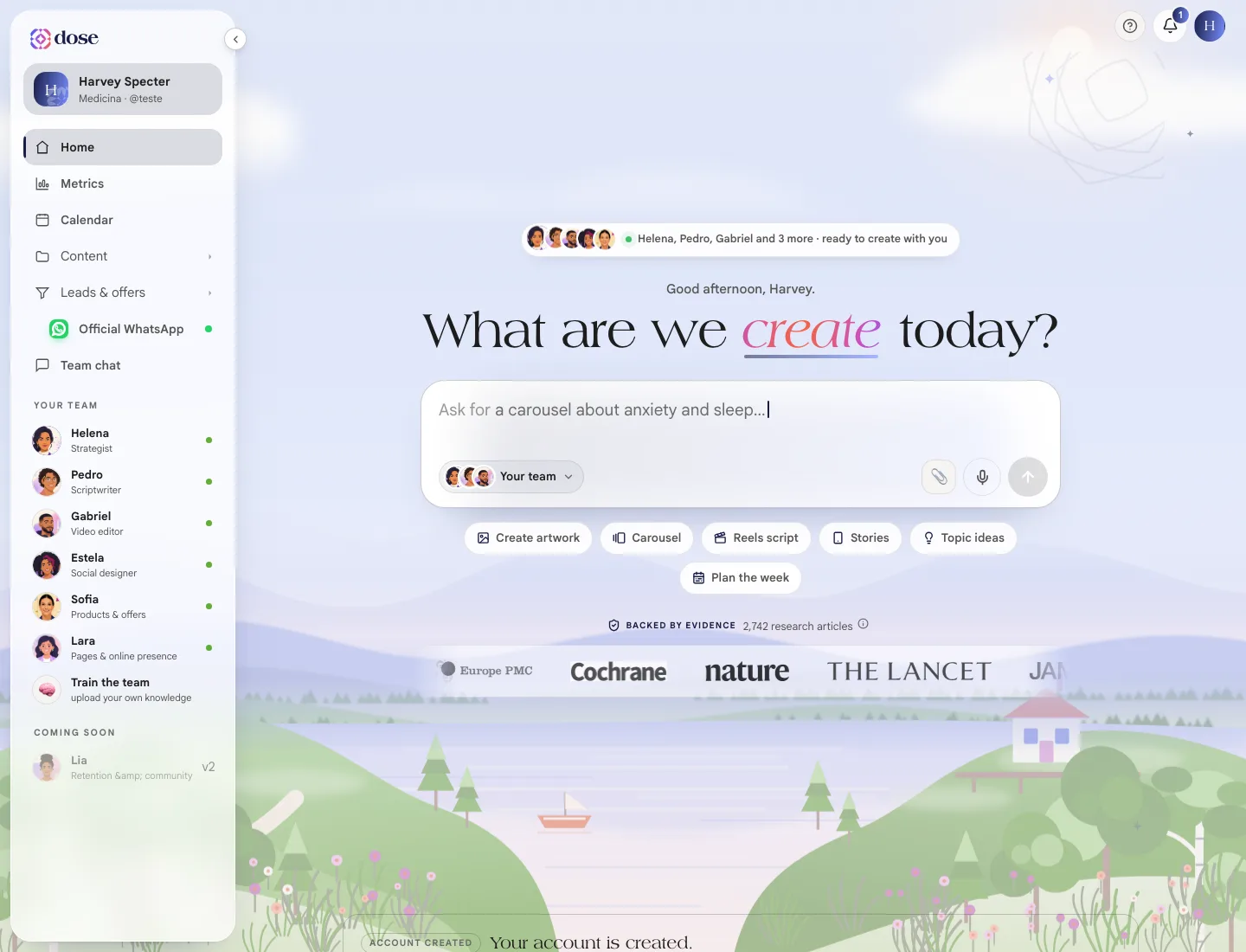
Your team
Section titled “Your team”Each area of Scale has a specialist in charge. You can talk to any of them in Team chat — or just ask, and Helena hands it to whoever does it.
| Who | Role | What they do for you |
|---|---|---|
| Helena | Strategist | Builds the 30-day plan, opens your day with the brief and hands out requests |
| Pedro | Scriptwriter | Writes scripts with a hook, a turn and a call to action, ready to film |
| Estela | Social designer | Creates carousels and stories in your visual identity |
| Gabriel | Video editor | Cuts, subtitles and finishes the video you filmed |
| Sofia | Products & offers | Helps you shape what you sell: consultation, follow-up, ebook, course |
| Lara | Pages | Builds link-in-bio pages, landing pages and quizzes |
| Theo | Publishing & ads | Publishes to your Instagram and runs your ads |
How the menu is organized
Section titled “How the menu is organized”On a computer, the menu sits on the left. At rest it shows only a few lines — groups open when you click them.
| In the menu | What’s inside |
|---|---|
| Home | Your day: what to ask for, what’s ready and what’s waiting for your approval |
| Metrics | From reach on Instagram to contact on your page |
| Calendar | The whole month: what went out, what’s scheduled and what’s still an idea |
| Content | Artwork, Scripts, Video studio and Editor Pro |
| Promotion | Ads |
| Leads & offers | Products, Pages and Leads |
| Patient care | WhatsApp and, inside it, Conversations, Broadcasts and Tests |
| Team chat | The conversation with all the specialists |
Your profile isn’t in the side menu: it lives in the circle with your photo, in the top-right corner. That’s also where you see your credit balance, switch between light and dark theme and sign out.
On your phone
Section titled “On your phone”On your phone, the menu becomes a bar fixed at the bottom of the screen with Home, Metrics, Create, Calendar and Menu. The Create button (the + in the middle) opens the most-used shortcuts:
- Ask the team — tell us what you want and Helena hands it out
- Artwork or carousel
- Script
- Edit video
- Schedule a post
Credits
Section titled “Credits”What the team creates with AI — an artwork from scratch, a story, a script, a video edit — uses credits from your plan. You don’t need to memorize a table: the cost shows on the button itself, before you confirm (something like “Create carousel · 2 credits”).
Some things cost nothing, like building a carousel from the ready-made templates.
Your balance is in the menu under the circle with your photo, in the top-right corner. See the full table in Plans, credits and subscription.
Help on every screen
Section titled “Help on every screen”Every screen has a ? button in the top bar. It opens Help for this screen: what the screen is for, why it matters and the Take the tour of this screen button, which highlights each part of the screen and explains what it does.
In this guide
Section titled “In this guide”Getting started
- Create an account and first sign-in — signing in, recovering your password and the first steps.
- Home — your day in Scale: the request, Helena’s brief, the approval queue and the shortcuts.
- Profile and your brand — the context the team uses to write and the visual identity every artwork follows.
- Connect Instagram — publish, schedule and see your metrics.
- Plans, credits and subscription — what each creation costs, subscribing, buying credits and canceling.
Content
- Artwork and Ready-made carousels — carousels and stories in your brand.
- Scripts — scripts ready to film, with a teleprompter.
- Video studio and Editor Pro — from raw footage to a video ready to post.
Publish and measure
Leads and patient care
- Products — what you sell, with a price and a payment link.
- Pages and Leads — your online presence and who left their contact.
- WhatsApp receptionist — 24/7 patient care, with Conversations, Broadcasts and Tests.
- Team chat — the conversation with all the specialists.