

Home
Home is your hub in Scale: the place to ask the team, read today's brief, see what's waiting for you and start a creation in one click.
Home is the first screen after you sign in to Scale, and it answers the question every morning brings: what do I post today? Here you’ll find what Helena prepared for your day, what’s ready and waiting for your approval and the shortcuts to start any creation.
To come back to it from anywhere, click Home in the menu (or the house icon, on your phone).
Ask the team
Section titled “Ask the team”The top of the screen is a single field: “What should we create today?”. Type — or speak, using the microphone — what you want, the way you’d say it to a person:
- “a carousel about fasting myths”
- “three stories to promote my November schedule”
- “a reels script about sleep and anxiety”
Right below the field are shortcuts that fill in the request for you: Create artwork, Carousel, Reels script, Stories, Topic ideas and Plan the week. The paperclip next to the microphone attaches a photo to your request.
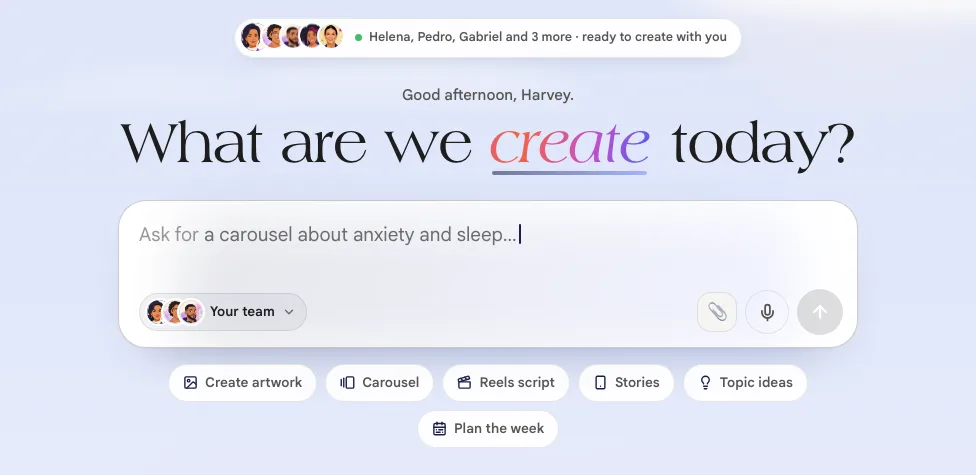
Who does what. You don’t need to know who to ask: based on your request, the team picks who does it — a carousel goes to Estela, a script to Pedro. If you’d rather choose yourself, click Your team, next to the field, and switch.
The answer arrives right there, without you leaving Home. If the conversation grows, Open in Chat takes it all to Team chat.
Let’s make it look like you
Section titled “Let’s make it look like you”While your account isn’t set up yet, Home shows a checklist with how much is left (something like “33% set up · 1 of 3”). Each step has a button that takes you there:
- Connect your Instagram — that’s where the team gets your handle, your photo, your topic and your way of speaking;
- Set up your brand — your colors, your logo and your fonts. See Profile and your brand;
- Your first pieces are on the way — shows up if you started from your Instagram handle: the pieces the team already made from your profile.
Use Collapse to hide the list and See what’s left to open it again. It goes away once everything is done.
Helena’s brief
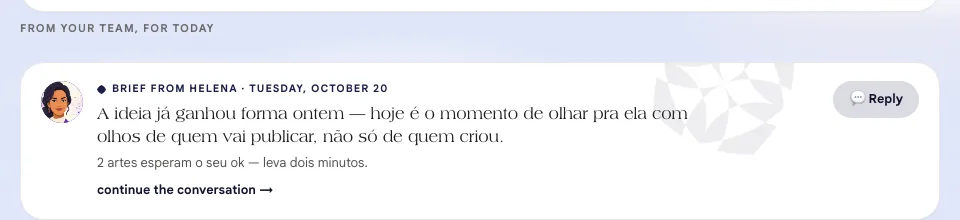
Section titled “Helena’s brief”In the From your team, for today section, Helena opens your day: what’s ready and waiting for you, and what needs you to move forward. Want to reply or ask for a change? Use 💬 Reply.
Today’s suggestions, with sources
Section titled “Today’s suggestions, with sources”Today’s suggestions are topics picked from the scientific library for your field. Each one shows the study that backs it — the type (meta-analysis, review…), the journal, the year and a summary — so you can read the source before you decide to post. When the study has an important limitation, the suggestion flags it (for example, “The study is in pregnant women”).
Like one? The buttons below it turn the topic into a 🎠 Carousel, a ✍️ Script or an 📘 Ebook.
For now, these suggestions show up for accounts in Portuguese.
Plan your month from your handle
Section titled “Plan your month from your handle”With no Instagram connected and no plan built yet, Helena offers a shortcut: type your handle and click Plan my month →. She reads your public profile — your photo, your bio, your latest posts — and builds 6 weeks of ideas in your tone, each with a study from the library behind it.
This doesn’t use credits, and nothing is created until you click an idea.
The creation shortcuts
Section titled “The creation shortcuts”Four buttons take you straight to each type of creation, with the right specialist already waiting — and each one shows what it costs:
| Shortcut | What it does |
|---|---|
| Edit video · 10 credits | Upload the raw footage, pick the format |
| Create carousel · 2 credits | Starting from a reference |
| Create stories · 4 credits | In your identity, in minutes |
| Video script · 2 credits | Hook, turn and call to action, ready |
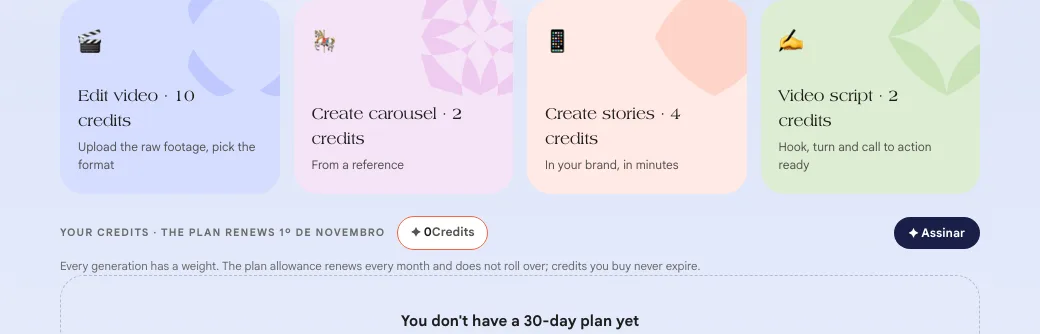
Right below, the Your credits bar shows your balance and when your plan renews:
- your plan allowance renews every month and doesn’t roll over from one month to the next;
- credits you buy separately don’t expire.
The 30-day plan
Section titled “The 30-day plan”Helena’s plan organizes your month into four themed weeks, and every item already has someone on the team in charge of it. It starts from what you told us in your profile — your biggest blocker and how much you can film.
If your Home shows “You don’t have a 30-day plan yet”, click ✨ Build my plan with Helena and she builds the 4 weeks with you in a conversation. To change a plan you already have, talk to her: “I want to change the theme of week 2”.
For you to handle today
Section titled “For you to handle today”Everything waiting on your say-so sits in a single queue:
- a script from Pedro waiting for your ok;
- an approved script you still need to film;
- an edited video waiting to be downloaded and posted;
- an edit that got stuck — Gabriel explains what happened.
Each item has buttons to handle it right there, like 👀 View, 🎬 Teleprompter (to film while reading the script) and 📹 I filmed it. Once you handle it, the item leaves the queue and the team knows right away.
When there’s nothing pending, the queue tells you: “All caught up. Nothing waiting on you.”
When your account has no plan yet
Section titled “When your account has no plan yet”If you created your account but haven’t subscribed yet — or the payment didn’t go through —, Home shows a notice:
- “Your account is created.” with the Subscribe and unlock everything → button, or
- “Payment not completed” with the Resume the payment → button.
Without a plan, you can already create and download content with the sample credits. The notice lists what only comes with a plan: Publishing to Instagram, WhatsApp receptionist and Ads.